What is a UK TV Proxy Streaming ?
A UK TV proxy is a method to change the apparent location of your computer or device in order to watch a television show or movie restricted to a specific country. You change your virtual location by routing through a proxy or VPN server so that you will be able to watch wherever you are.
Well, if you’re like me and spend a lot of time outside the UK, whether on business, travelling or maybe you’ve retired somewhere sunny! One of the first things I miss is being able to watch UK TV abroad, which is funny as I’m not even a great television fan. So, this post is about some of the options you can use to watch UK TV simply and easily.
 So can you beat this, sitting on a balcony with a view of a Turkish sunset, with my laptop watching the BBC News, a bottle of lager and then an episode of Dr Who.
Let me tell you it certainly beats most Turkish TV, although to be fair I can get one or two English speaking channels now. Doesn’t quite compare to the choice here on the BBC iPlayer
So How Can I Use a UK TV Proxy?
It’s not difficult, and in fact I and many others have done it for well over a decade now for watching UK TV anywhere. However, it won’t happen without you taking some action otherwise you’ll be stuck with restricted access to the world’s online TV stations.
For most people that means you’ll have online access to the domestic TV stations of the country that you’re physically located in but little else. What’s more there are lots of other websites which you’ll probably have problems accessing too. I found I wasn’t able to place a bet on the Grand National through my William Hill account when I was on holiday. Mind you with my record that was a blessing in disguise.
This post is about TV though and the fact that as soon as you step outside the United Kingdom, then you’ll discover that hundreds of the best web sites are classified as UK only.
Possibly the most important one which most people miss is the BBC iPlayer. This is a real blow for anyone who has ever enjoyed UK television. The BBC iPlayer is one of the premier sites on the internet and allows you access to live stream any BBC TV channel plus access to an archive where programmes are stored for a year after. It’s a truly amazing site and it far surpasses many expensive cable or satellite packages.
Anyway, don’t worry there are solutions, in fact over the years there have been many different options. Unfortunately, lots don’t work anymore but we’ll mention them here as it can sometimes be rather confusing.
Using a Free UK Proxy Server
So, the primary problem you’ll find accessing any sort of media from outside the country of origin is that it is normally restricted by geolocation or geo blocking. In simple language each web site does a little check on your IP address to see what country you are in before you start watching. So, if you try to access a UK TV via BBC iPlayer or to watch the BBC News for example you may see this message. Basically, you need a UK IP address to access web sites like BBC TV.
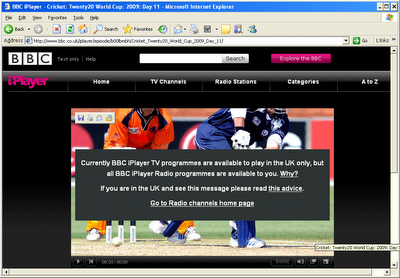
This has looked up my IP address, seen that I am not from the UK and blocked my access.
Interestingly these look ups don’t always work correctly, lots of French IP addresses don’t get blocked for example so it’s always worth checking – but for the majority you’ll have to find another way.
The general principle is that you need to make the BBC website think you’re in the United Kingdom and hide your real IP address for everything to work. Any method for a BBC iPlayer proxy will primarily need to achieve this or you’ll never be able to watch online. The most effective method is to simply bounce your internet connection through a UK based proxy or VPN service, the website sees the address of the proxy and thinks you’re in the UK!
Many years ago, probably about 2012, then it was relatively straight forward to achieve this. All over the internet there are thousands of what’s called proxy servers which are available completely free of charge which you could use to start watching UK TV. They exist for a variety of reasons, accidentally left open, hacked or even created by some free speech advocates. Many of them were based in the UK too, so you could search online and get the address and get yourself working in minutes.
When you’d found some free proxies based in the UK and then all you had to do was enter this in your browser’s proxy settings. For Internet Explorer you’ll find it under tools, internet options, connections, LAN settings – here’s the screen.

It only took a minute to change the settings, restart your browser and then you should be able to access the BBC and all other UK TV stations.
Anyway, this method has long since stopped working, because about seven years ago, the BBC implemented technology that could detect proxies being used like this and they were blocked automatically.
IN truth it’s possibly a blessing in disguise, there is a huge security risk using these free proxies as they were increasingly used to steal logins, credentials or install viruses on their unsuspecting users. It’s also technically illegal too!
Remember Free Proxies don’t work for accessing UK TV anymore.
This option was blocked by the BBC relatively late on, but all the other UK TV channels have also blocked these including the British version of ITV and Channel 4. Most of the other large media sites have implemented the same blocks too such as Hulu, ABC and most USA media sites. There are other blocks too which have stopped other free options which were supported by advertising, none of these like Expat Shield work well with the BBC in particular. Even if you could put up with the slow buffering and connection speeds, they certainly weren’t the ninjaproxy you need. Today you need something more sophisticated that cannot be detected, for most TV channels this means using what’s called a VPN (Virtual Private Network).
Use Identity Cloaker and Watch Using a UK TV Proxy
The only current feasible option in 2023 is to use a private proxy or VPN services. There are lots of these about with different services and payment options but the one VPN provider I’ve used primarily because it’s so reliable is called Identity Cloaker.
Now there are loads of web sites offering this sort of service but many of them simply don’t work with most of the major TV stations including the BBC. There are lots of stories saying that BBC iPlayer VPN is not working which is partly true with many providers being blocked. I chose this program for the following reasons.
- It’s not marketed as a UK TV Proxy; these companies routinely get threats from the BBC and other agencies -so run a big risk of being shut down.
- This is a professional program which protects your online privacy created and supported by a licensed company.
- The software sits in your toolbar and is extremely easy to use. You just point and click when you want to connect and view TV.
- They don’t automatically re-bill or charge your credit card when subscription expires.
- The software does much more than most of the UK TV abroad/proxy programs and allows access to servers in countries all over the world (not just UK TV)
- Support and administration are first rate
- Much cheaper than all the other options I looked at with a money back guarantee
It is basically a little program which sits in your tool bar and allows you to connect to a network of proxy servers all across the world. It’s primarily a security program but performs the same service as the various UK TV proxy services. The price is cheaper than any of the ones I looked at (from EUR 6.60 a month) and it has more servers than most, plus when you use a VPN you can watch lots of content from all the other countries. Just as importantly it doesn’t mention all the TV functions on the main page, which means that the UK companies won’t block the proxies they are using.

Basically, it’s an advanced security program which gives you access to a network of highly secure proxies all over the world. All the servers are fast and secure, so it doesn’t matter which ones you use – of course if you’re trying to bypass blocks then you’ll need to select the right country. It also is one of the few solutions you can use in work as there are settings which can easily bypass firewall restrictions. Don’t be worried about them not advertising the UK TV functionality it’s well supported with a huge number of UK proxy servers. However, it’s definitely best for VPN providers to be discrete in this area! It’s what I’ve used to watch British TV programmes like Dr Who for example – for well over a decade and it’s never let me down.
Not Just the BBC and UK Channels – Explore a World of Proxy TV Streaming for Free
The real beauty is that you can also use it to connect via a VPN which lets you connect to ITV, All 4, STV player and lots of other UK TV channels too. Also, your subscription pays for lots more proxies all across the globe – you can watch lots of US sites like HULU, NBC and ABC for example. They’re also quick to offer help and support for whichever TV channels you need. Remember you can also unlock your expensive subscription channels which also get blocked, use the UK servers if you want to watch Sky Go, BT Sport or Now TV using your subscription.
Try the 10-day trial first to make sure it works ok for you.
Watch UK TV Abroad trial
Well whatever option you decide to download TV broadcasts from the UK – good luck. Believe me – you can watch UK TV abroad and feel free to post any experiences or opinions below.




I want to watch the BBC News from Russia especially about the Covid crisis, will this program work for me? I just have an ordinary computer and a home internet connection. I’ve tried free proxy servers and none of them work.
Hi, yes it will work perfectly for all the UK television sites, many British expats use it everyday in 2021 for the same reason. One thing you should know is that they require users to register an account on them before you start live streaming. Don’t worry about this, just connect to a UK server first and then create an account. They will ask you for a post code (like a US zip code) but you can use anyone for that as long as it’s valid just grab one from any UK business. There is no further checks but you will be asked if you have a UK Tv license, just say yes !
I only want to use a VPN for a few hours to watch the British version of a documentary on the BBC. Would one of the free ones do if I don’t use it for any sensitive data?
It might but the problem is actually finding one that works. Even the cheaper paid VPNs struggle getting access as they’re overloaded and get blocked from the site. You might get lucky though. If it’s really slow you might be better downloading the program when connected. There are a couple of VPNs with free trials which might help and Identity Cloaker has a ten day trial which is very reasonable and you can use for all the UK sites including BBC and ITV player (known as ITV Hub now).
Just a quick update that Identity Cloaker is still up and running for accessing UK TV stations anywhere in the world in 2017. A couple of developments – ITV Hub and now BBC iPlayer now need you to register an account. Don't worry about it, connect to a UK proxy server as normal and you'll need a valid UK postcode in the registration.
Any questions feel free to post.
~I have been using identity cloaker for a couple of years now, I live in turkey and it works with all the terrestrial channels, bbc, itv, channel 4 and 5.
It is also great for TV around the world with proxies in the USA, canada, and various countries in europe.
for about £70 a year it is well worth it and it also encrypts you internet usage if you want so it makes it harder for people to spy on what you are doing.
I definitely recommend it if you need access to TV from around the world. The free proxies rarely work well.
Version 2 also allows you to use the normal proxy service to access TV and you can have that start automatically with the PC, where as the VPN needs to be logged in each time you start the TV.
~I have been using identity cloaker for a couple of years now, I live in turkey and it works with all the terrestrial channels, bbc, itv, channel 4 and 5.
It is also great for TV around the world with proxies in the USA, canada, and various countries in europe.
for about £70 a year it is well worth it and it also encrypts you internet usage if you want so it makes it harder for people to spy on what you are doing.
I definitely recommend it if you need access to TV from around the world. The free proxies rarely work well.
Version 2 also allows you to use the normal proxy service to access TV and you can have that start automatically with the PC, where as the VPN needs to be logged in each time you start the TV.
If anyone's interested – I've just put a post up on how to use Identity Cloaker to watch BBC Iplayer and UK TV on an Ipad, Iphone or Mac (haven't tested Mac yet but should work fine)
– it's here
BBC Abroad on the Ipad
Hope it helps someone.
I heard that too – they've closed down everything. You would have thought they could at least have kept their proxies up for existing customers.
They will probably have had a complaint/threat of legal action to their hosting company by one of the TV companies – BBC regularly do this. Most will just give in – quite a few companies have disappeared like this.
They target the companies openly advertising the ability to watch TV channels on their sites – they're all wide open for legal action.
Anyway sorry you lost out Tim!
I did hear that ukproxyserver.co.uk
were offering customers who'd lost out free subscriptions, might be worth checking out.
http://www.tvproxy.co.uk seems like it has just been closed down. With the following message coming up when you try any site related to them;
Address not available from this machine
Check that the address is spelled correctly.
half way through a year's subscription means I've lost 30-40 quid. DON'T USE THEM
Hi Gina,
Sorry I thought I'd replied to this, but I hadn't! Glad you like IDC it's a great little company and they do look after their customers. I pester them all the time and they always try and help!
They've just upgraded some more of their UK servers for 2012 as well – so should be even better now.
It does work with an Iphone although the functionality isn't advertised widely yet as they haven't fully tested it.
Drop me a line at ngbconsult(at)gmail.com and I'll drop you the connection details.
WG
I have been using identity cloaker for over two years now and it is great. Switched from hidemyip, which seemed to be far more "iffy". Support from Tomas is always immediate and first rate. Don't think he ever sleeps. Read somewhere that I could use IC on my iPhone for iplayer, but have had no success. Do you know if IC is compatible with the mobile version. Gina
Yep it gives you full access to the Sky box and all features. If you can get a fast internet connection in Australia might be your best option especially if free as your sister already has one!
"With regards to Overplay I will subscribe now, as Australia doesn't seem to have a great net bundles as we have hear would you be able to estimate how much data this would use? "
Well Overplay subscription has unlimited bandwidth so it doesn't really matter from that side.
But please remember you also still need an Australian ISP(Internet Service Provider) end to access the internet and they may have bandwidth restrictions.
For films/BBC Iplayer etc allow something like 30MB an hour if you're streaming video but this could vary depending on the quality being streamed of course. But for a very rough guess you'd need 30GB a month for 3 hours a day.
Hope that makes sense!
WG
Thanks WG for the rapid response, does the slingbox option allow you to watch sky plus recorded shows?
With regards to Overplay I will subscribe now, as Australia doesn't seem to have a great net bundles as we have hear would you be able to estimate how much data this would use? I suspect I would use a max of 3 hours a day?
Thanks so much for dishing out friendly easy to use advice, lovely to have someone who is able to help
Hi cumberlandandbow,
Thanks for the comments 🙂
If your sister already has a slingbox then yes that would work – you just need to install the slingplayer software on your PC (from http://www.slingbox.com/) and then get the Finder ID for her box.
The downside is that you would have both have to watch the same thing if she was using it (although I'm guessing the Timezone difference might mean this could work out quite well!!)
Identity Cloaker for the Mac is still not officially released (I'm starting to suspect it might never!)
Overplay is definitely a good option – easy to install ,very decent price, great support and you can subscribe a month at a time.
If you have any issues, post them up and I'll try and help 🙂
Cheers
WG
Hello Everyone,
I am about to move to Australia and have found the posts by everyone really helpful.
I switched to a mac about 2 months ago and it looks like identity checker is still not available so is Over Play still the best option for the MAC?
As a lots of people have posted I am not very good with computers so any help would be much appreciated.
If my sister has a slingbox attached to her tv would I also be able to hook into that?
Thanks in advance
Hi Kingdar,
Glad it's working well for you. Sky Player has been a bit of a problem recently.
Last time I checked it seemed to be blocking multiple connections from a specific IP – so if no-one else was using that IP address you were OK but if they were you couldn't connect properly.
Identity Cloaker obviously has a lot of UK IP addresses but I guess quite a few use Sky Player as well. Try switching between IP addresses until you get a connection.
I'm away at the moment and don't have my Sky login with me but will have a look at this next week and post here. It certainly would be good to have for the sports season! I'll see if the new version of IDC helps at all.
Cheers,
WG
Hey WG,
Have identity cloaker and its working great for BBC and RTE and everything else apart from Sky player,1 station loads up the odd time but usually it come's up an error msg. Any advice would be much appreciated. Keep up the good work man!
Thanks for comment Alec – glad it's working out for you 🙂 – streaming HD needs a fast connection !
Watch out for the new version of Identity Cloaker which will be released soon to all subscribers.
I've been trying the beta version it and there is a significant speed increase plus loads of new features. Their putting in some new fast UK servers as well.
I've also got a couple of accounts with some other providers of VPN services which I want to test as well – will post reviews on this site.
Wg
I have used Identity Cloaker from the USA for the last 6 months and it works great. We connect a laptop to the TV with a HDMI cable and watch BBC iPlayer in HD on a big screen. Well worth the subscription.
Good morning – no I'm afraid the Mac version still hasn't been released yet!! Seems to be taking for ever.
Good morning,
I see that these comments were posted a few months ago. Can you tell me whether it is now possible to view Identity Cloaker on my iPad? Thanks.
Hi Sophie,
Sorry the Mac version has still not been released yet – not sure why they are taking so long.
The best option for a Mac user at the moment without doubt is a company called OverPlay
It's very easy to install and you just select one of the UK servers for BBC Iplayer, 4OD, ITV and Sky Player (but you need someones subscription for Sky)
It's $10 a month I think, but if you email them they'll usually let you try it first.
Great little service I use it on my Mac.
Any problems let me know and I'll try and help you.
Hi there,
I am trying to fathom this all out – it's really helpful, but I am pretty computer rubbish! I am trying to help a friend living in the US get some UK TV for Christmas. I gather you can access the 4OD, BBC iplayer & ITV through Identity Cloaker – can he use this if he is on a MAC?
If so, is it quite easy to set up once he has signed up for the trial? Sorry, you must excuse my ignorance, I am computer rubbish, and so is he, but I would love to get something sorted for him for Christmas and you really seem to know your stuff!
Thanks so much in advance!
By the way, there is a Mac version in development but it's not been released yet (seems to be taking a while!).
Mac users can use the proxies directly though for BBC – you just have to enable the proxy in your browser. It won't work for all the TV channels that need a VPN though like Sky and Channel4.
Thanks that's a really helpful introduction. I was all fired up and raring to go and try Identity cloaker (I live in India) but unfortunately I can't as I'm a mac user. I'll have to wait for the serve to be extended. Shame but I'll keep checking their site unless anyone else has a suggestion (I'm not too technically literate).
sf
Hi Mountwest,
Yep with the BBC Iplayer – just start the show playing and then disconnect Identity Cloaker from the cloaker menu – it should carry on streaming and not disconnect.
If you change to a different programme though you'll have to start it again though as it will check your location at the start.
I'm not sure when they are releasing the new version of Identity Cloaker. They have to do a lot of testing I think because it has many more features in it. I have tried it though and it's looking very impressive – most of the features are security related, enabling you to protect and encrypt specific applications – email, different browsers, FTP you name it.
But for those people who just use it for watching video and media sites the main advantage is that the proxy and VPN modes are built in. So it's much easier and flexible to use for accessing sites where a proxy gets blocked like Hulu and Sky for instance.
I'll let people know as soon as it's released, Identity Cloaker users will be informed automatically though.
Hi WG
Do you know when the latest version of ID Cloaker will be released?
Second, you mention that "you can disconnect from Identity Cloaker after your BBC program has started anyway and stream directly if you prefer".
If I am on the BBC website, would it not bounce me out if I disconnect from ID Cloaker?
Still messing with this whole VPN thing!
Thanks again for your help.
Cheers
Mountwest
No problem 🙂 – in fact the Identity Cloaker allowance is very generous and I'm fairly sure it wouldn't restrict you. In fact unless the servers get stressed then I don't think they're planning on enforcing the restriction just yet anyway.
Also remember you can disconnect from Identity Cloaker after your BBC program has started anyway and stream directly if you prefer.
I've just had a sneak preview of the new version of Identity Cloaker and the VPN connection is actually built in plus lots of new features for their subscribers.
Hi WG
Many thanks for the quick response. Being very much a novice when it comes to computers and their applications, it is good that there are some 'friendly' experts out there who are willing to share their knowledge and expertise with those less able. Not sure if I totally understand the difference with using IDCloaker Proxy and VPN, but it would seem that if i did use the Open VPN then I'd really hit hard into my monthly usage allowance. That being the case, I'm happy enough using the proxy to let me access BBC and ITV and also the Lottery Website! I may try some of the US sites in time, but again lots of thanks for pointing me in the direction of ID Cloaker. My wife is delighted that we can watch some 'Brit' programmes rather than the c**p we have to endure out here.
Cheers
mountwest
Hi Mountwest,
Glad Identity Cloaker is working well for you. I must confess haven't tried Zattoo for ages but it definitely did work. You have to use the VPN function though as the Zattoo player ignores proxies.
Unfortunately I'm in Uk for a few weeks now so can't try it out.
If you've already tried the VPN it might be a restriction on peer to peer traffic stopping you.
I know Zattoo uses a serious amount of bandwidth as you have to share your connection with other viewers. I'll check with the guys at Identity Cloaker for you and post back here.
WG
Hi Welshgadgets
I'm based in Qatar and thanks to your posts/advice, have now subscribed to ID Cloaker and can now access BBC IPlayer and ITV.
I see in this thread that some folks were having problems with some other sites and you advised them to change "locale".
I've been having problems with Zattoo managed to download but is states that it is not available in my location. I've changed all the settings on my laptop that I can think of but no luck. Any other ideas? Cheers
Hi Sf,
Thanks for the comments. Well you might be in luck – they've been having a few problems with the beta version for the Mac (mainly under OS X Tiger)
But there will be a new version being tested this weekend I believe – fingers crossed if its ok it may be the first released Mac version.
Send me an email using the contact us button at the top right of the page – and I'll send you a free trial account and the new Mac version as long as it works ok 🙂
welshgadgets
Yep Iain a good point, if you've got a friend with both a fast internet connection and who's willing to leave their PC on all the time. But of course it will only work for BBC Iplayer like that and bypassing some of the Chinese restrictions (until they introduce blocking with whitelists then nothing much will help!).
But if you're doing this you might be better looking for a friend with a bit of spare bandwidth on their UK based Linux VPS, then use Putty to connect to through to that and you've got your own SOCKS5 proxy 🙂 much more impressive !
To be honest it's a lot of work though to keep the server up and running and more importantly making sure the proxy is secure.
Incidentally, discovered why there are problems connecting to tvcatchup.com – they've gone a step further and blocked IP addresses from the major datacentres in the UK – which means most of the professional solutions won't work.
Identity Cloaker guys are looking at setting up some workaround though so you can watch all the available UK TV channels – watch this space 🙂
I can't help but offer one other choice for the technically-enthusiastic: Grab an old pc, sling on a copy of ubuntu server and install the Squid proxy then just proxy through your own home internet connection. I used this method to watch iPlayer in China, as well as look at the sites the Chinese gov don't like. This is the only FREE method you can use, if you have access to a uk internet connection (ie a mate's house).
Not tested that site yet, but am very surprised it doesn't work with the VPN option even if the proxy mode doesn't work.
It sounds like it might be also checking the location from the computer locale – try changing the locale -in Vista it's control panel/clock language and change region. Quite a few websites pick up your location from this as well as using IP address.
Might be worth checking, I'll see if I can test next time I'm outside UK in a couple of weeks.
It seems to work fine for BBC ITV etc but tvcatchup.com. denies access by sayin "Non UK Location" is there a way to get around this?
Someone emailed me about how to use the VPN option with Identity Cloaker.
You'll need this to connect to many TV channels including the Channel 4 and ITV ones in the UK.
Some help here.
ITV Abroad
Or the Hulu post above has a short video, just remember when watching from a VPN to select the right country – Identity Cloaker has a lot of servers to use so you can watch restricted TV of many countries.
Hope that helps.